Looking for Prusa Easy Print alternatives?
Prusa Easy Print is Prusa's cloud slicer: PrusaSlicer running on Prusa's servers, behind a deliberately simple front-end, free on Printables and in the Prusa App. The idea is lovely, slice a Prusa print in a few taps from your phone or tablet, and for a quick first print it works well.
But "easy" is the whole design: Easy Print hands you a handful of high-level choices (a quality preset, material, infill, supports, adhesion, some MMU color painting) and decides everything else, temperatures, speeds, flow, retraction, for you. There's no full settings tree. When you need real control, Prusa's own answer is to download the project as a 3MF and open it in desktop PrusaSlicer.
SimplyPrint runs the same PrusaSlicer engine in the cloud, on the same phones, tablets and Chromebooks, but gives you 100% of the settings, not a preset picker, plus OrcaSlicer, BambuStudio, ElegooSlicer, CrealityPrint, Cura & Kiri:Moto for when you don't print only on a Prusa. Same easy cloud slicing, without settling for less of a slicer. Here's a fair, side-by-side look.
The actual slicer alternatives to Prusa Easy Print
Looking for a different slicer, not just a different device? Fair enough. These are the real alternatives - and every one of them runs online, in your browser, through SimplyPrint.

PrusaSlicer
The obvious one: Easy Print is a simplified front-end for PrusaSlicer, so the full PrusaSlicer is the alternative - every setting Easy Print hides, from speeds and flow to seams and modifiers. Free on desktop, or online with all its settings through SimplyPrint.
Use PrusaSlicer online
OrcaSlicer
The community favourite: open-source, descended from the same PrusaSlicer lineage, with a famously deep settings tree, calibration tools and profiles for hundreds of printers of every brand.
Use OrcaSlicer online
BambuStudio
Bambu Lab's official open-source slicer (itself built on PrusaSlicer). The go-to if you also run Bambu printers, with first-class AMS multi-color support.
Use BambuStudio online
Cura
The established open-source slicer from UltiMaker, with broad printer and material profile support and a large plugin ecosystem.
Use Cura onlineOne slicer, every engine, on any device
The SimplyPrint cloud slicer runs the real PrusaSlicer, OrcaSlicer, BambuStudio, ElegooSlicer, CrealityPrint, Cura & Kiri:Moto engines - 100% of the profiles and settings, in your browser, on a Chromebook, tablet or phone. Import your profiles, slice, then send straight to your printers. See it all, with screenshots, on one page.
Explore the cloud slicer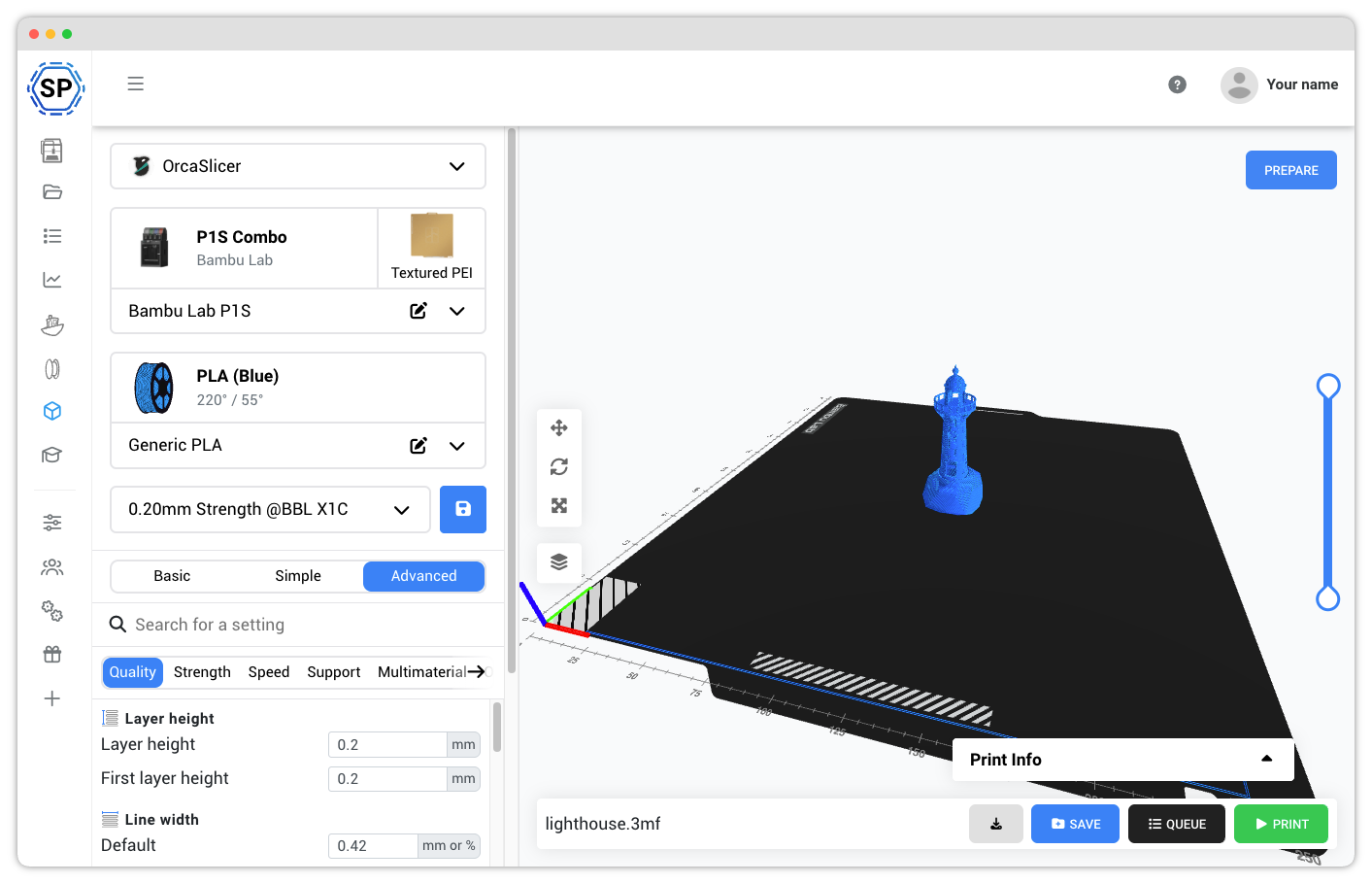
Prusa Easy Print is PrusaSlicer in the cloud with the settings turned down to a handful of choices, built so a Prusa owner can slice fast from a phone or tablet. It's free and official, and for simple Prusa prints it's genuinely nice.
SimplyPrint runs that same PrusaSlicer engine in the cloud too, on the same devices, but as a full slicer: 100% of the desktop profiles and settings with identical G-code, not a simplified preset picker. And it runs OrcaSlicer, BambuStudio, ElegooSlicer, CrealityPrint, Cura & Kiri:Moto alongside it, for all major FDM brands. If Easy Print's simplicity is all you need for a Prusa, it's a fine free tool. If you want the whole slicer, and more than one engine or brand, that's SimplyPrint.
A real slicer, not a stripped-down preset picker
Both run PrusaSlicer in the cloud, so this isn't about the engine, it's about how much of it you get. Easy Print is simplified on purpose; SimplyPrint gives you the whole thing.
One engine for one brand, or every engine for every brand
Easy Print is PrusaSlicer, built for Prusa printers. If your bench only has Prusas, that's fine. The day it doesn't, you need a slicer that speaks more than one language.
Where Prusa Easy Print is the better pick
Easy Print is a genuinely nice tool for what it's for, and Prusa built it well. Credit where it's due:
Prusa Easy Print and SimplyPrint comparison
Nothing is black-and-white, and there are always pros and cons to consider when choosing a 3D printing cloud solution!
And we're not here to simply tell you, that SimplyPrint is the best - we want you to make an informed decision, and of course there are pros of using Prusa Easy Print as well!
Pros of using Prusa Easy Print
Prusa Easy Print has real strengths, and they're worth being honest about:- Free and official from Prusa: made by Prusa Research, free on Printables and in the Prusa App.
- The real PrusaSlicer engine: it's a simplified front-end for PrusaSlicer running on Prusa's servers, so the underlying slicing is the genuine article.
- Genuinely easy: pick a quality preset and a material and slice; it's about the fewest taps to a finished Prusa print, great for beginners.
- Runs on phone, tablet and browser: because slicing is server-side, it works from a phone, tablet or laptop with nothing to install.
- Tight Prusa & Printables integration: slice straight from a Printables model and send to your Prusa, with MMU multi-color painting supported.
Cons of using Prusa Easy Print
Where Prusa Easy Print falls short if you want a full slicer:- Only a handful of settings: it exposes high-level options (preset, material, infill, supports, adhesion) and auto-decides speeds, flow, temperatures and retraction. There's no full settings tree, and Prusa's answer for real control is to open the 3MF in desktop PrusaSlicer.
- A throttled free tier: each plate is capped at about 60 seconds of slicing with an undisclosed daily limit, one job at a time, and very large or complex models are refused; heavier work needs the paid subscription or the desktop app.
- PrusaSlicer only: one engine. A Bambu or Creality print means switching to that brand's software.
- Prusa-first: primarily designed for Prusa printers; it reaches around 22 other brands over LAN, but Bambu Lab is excluded from sending jobs.
- Slicing only: it's a slicer, not a print platform, so there's no built-in queue, monitoring, AI detection or team management beyond Prusa's own tools.
Prusa Easy Print vs. SimplyPrint
Side-by-side list comparison of details and features in Prusa Easy Print and SimplyPrint

|

|
|
|---|---|---|
| Slicing & devices | ||
| Runs the real, unmodified engine ? | ||
| Every desktop setting (not a stripped preset) ? | High-level options only | |
| Slicing engines available | 1 (PrusaSlicer) | 7 engines |
| Import your existing profiles | Presets only | |
| Multi-color / AMS support | ||
| Slices for all major FDM brands ? | Prusa + ~22 via LAN | |
| No install (opens in a browser) | ||
| Windows & macOS | ||
| Linux | ||
| Chromebook / ChromeOS ? | ||
| iPad & Android tablets | ||
| Phone (iPhone & Android) | ||
| Old / low-power machines ? | ||
| Send to your printer + monitor remotely | Prusa + LAN brands | |
| Profiles synced across your devices | Projects only | |
| Compare | Learn more | Learn more |
SimplyPrint prices are shown in USD; see our pricing page for your local currency. Competitor prices are shown as they publish them.
Contact us if you think we made a mistake in our comparison!
Prusa Easy Print vs. SimplyPrint: frequently asked questions
Prusa Easy Print vs SimplyPrint: which should I use?
Does Prusa Easy Print have all the PrusaSlicer settings?
Is Prusa Easy Print free?
Can Prusa Easy Print slice for non-Prusa printers?
Does SimplyPrint run PrusaSlicer in the cloud like Easy Print?
Can I use my existing PrusaSlicer profiles?
Conclusion
Why SimplyPrint is the Top Prusa Easy Print Alternative
We made SimplyPrint due to the fact, that nothing else on the market quite fit our needs. We wanted a platform that was easy to use, but still had all the features we needed. We wanted a feature-rich platform, intuitive and easy to use, with a great user experience and actual innovation within the 3D print management software space.
In summary, we - humble and unbiased as we are 😉 - believe that the SimplyPrint platform is a great Prusa Easy Print alternative!
Get started - free forever