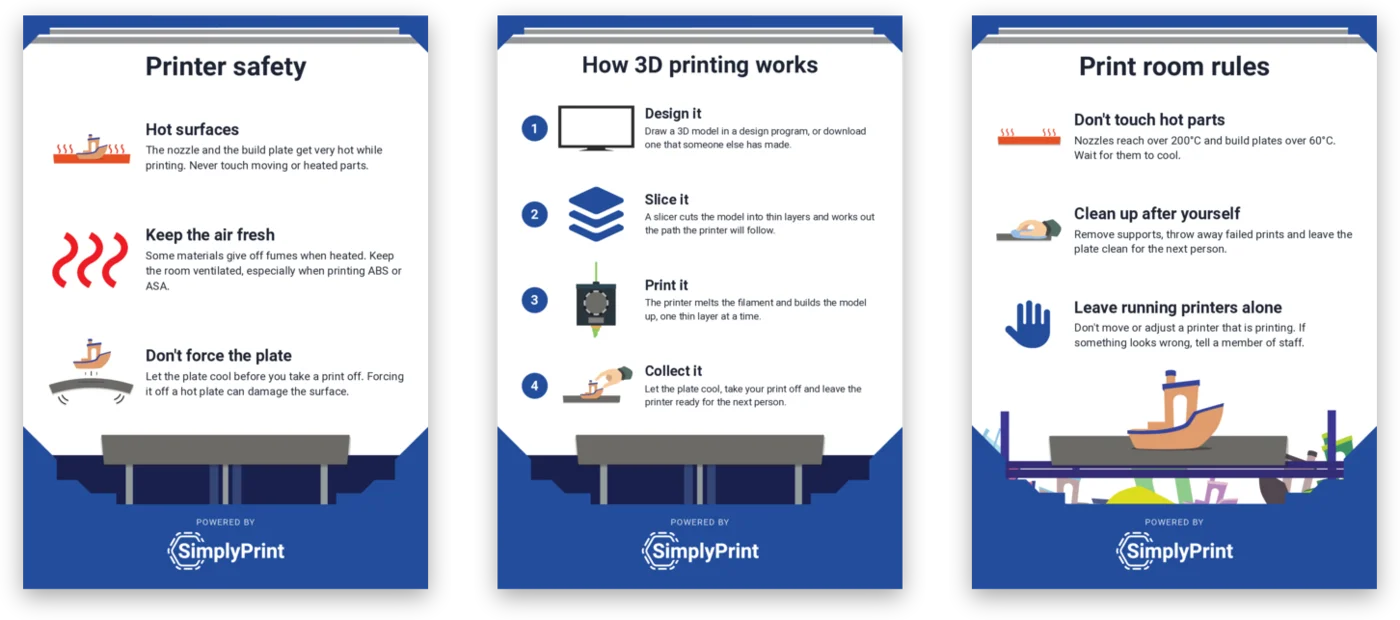
Good 3D printer rules are what turn a room full of printers into a print room that runs itself. In a makerspace, a library or a school, many people share a few machines. Most problems are not technical: a print left on the plate, a spool unwinding on the shelf, someone adjusting a printer mid-print, or one person's 20-hour job blocking everyone else for a day.
This guide covers how to run a tidy, safe and self-serve 3D printing room. It starts with the short list of rules every room needs, then how to teach them, how to share the printers fairly, who looks after the machines, and how to keep the rules in front of people. Many of these are habits rather than rules, and the best rooms make the right habit the easy one.
What makes a shared 3D printing room work?
A shared print room has three jobs, and every rule supports one of them:
- Nobody gets hurt. Printers have a hot nozzle, often a heated build plate and moving parts, and melting plastic releases particles and gases.
- Everyone gets a fair turn. There are always more people than printers, and some prints take many hours.
- The printer is ready for the next person. Every print should end with an empty, clean plate and a printer someone else can start straight away.
When one of these breaks, people stop trusting the room. They hover next to "their" printer, skip the queue, or stop coming. The habits below keep all three working without a supervisor standing in the room all day.
The 3D printer rules every print room needs
Keep the list short. Five or six rules that everyone remembers beat a two-page policy nobody reads. These work in most makerspaces, libraries and school print rooms:
| Rule | Why it matters | Where to post it |
|---|---|---|
| Don't touch hot parts | Nozzles reach over 200°C and build plates often over 60°C | By the door and on each printer |
| Leave running printers alone | Moving or adjusting a printer mid-print ruins the job and can hurt you | By the door |
| Clean up after yourself | Supports and failed prints left behind block the next person | Next to each printer |
| Report a problem, don't fix it | A jam or a loose part is a job for whoever looks after the printers | By the door |
| Only print allowed materials | Some materials need more ventilation or a different printer | By the filament shelf |
| Label your print | Finished prints reach the right person, and nobody takes someone else's | Next to each printer |
Two more decisions belong with the rules, even if they are not on the poster: who may load filament or open a printer, and what to do when a print fails or something smells wrong. Write both down, and make sure the person in charge of the room agrees with them.
Keep the safety rules specific to your equipment. Follow your printer manufacturer's instructions, and your school's, library's or organisation's own health and safety guidance. Rules that differ from what the manual says will be ignored, and rightly so.
Teach the rules before anyone prints
Rules on the wall remind. They don't teach. Before a person's first print, run a short induction. It should cover:
- Heat and moving parts. What gets hot, what moves, and that hands stay out of a running printer.
- Air quality. The US National Institute for Occupational Safety and Health (NIOSH) guide Approaches to Safe 3D Printing, written for schools, libraries and makerspaces, recommends ventilated enclosures, local exhaust ventilation, training users on the hazards and limiting who has access to the printing area. Read it before you decide where the printers go.
- How the room shares the printers. How to submit a job, how long a print may run, and what happens to a print nobody collects.
- What to do when something goes wrong. Who to tell, and what not to try to fix yourself.
Finish with a short knowledge check rather than a signature on a sheet: a few multiple-choice questions show you who has actually understood the rules. The how to teach 3D printing guide walks through a whole progression, from the first design lesson to independent printing.
Make it self-serve, and fair
A self-serve print room is one where people can print without asking a member of staff, and without stepping on each other. Three habits make that work.
One shared queue. Jobs wait in a queue instead of people carrying files to whichever printer looks free. Each printer takes the next job once its plate is cleared, and long jobs can run overnight. Nobody needs to guard a printer, and long jobs stop blocking short ones by accident.
Approval for newcomers. A new member's first jobs wait for someone to check them before they reach a printer. This catches the 14-hour print, the part that will never stick to the plate and the wrong material.
Allowances. Give each person a print-time, print-count or material allowance per week, month or term. People value printer time when it is visibly limited, and it stops one person from filling the queue.
None of this needs software, but it is much easier to keep fair when the queue, the approval step and the allowances live in one place instead of on a whiteboard. In SimplyPrint, for example, print approval holds a job until a teacher or staff member approves it, and quotas set allowances per user group.
Put the rules on the wall where people need them
A rule is easiest to follow when it is in front of you at the moment you need it. Posters do that job better than a handbook, so put each one where its task happens:
- By the door: printer safety and the print room rules, read by everyone on the way in.
- Next to each printer: how to clean the build plate and how to change filament.
- At the filament shelf: how to look after filament, so spools stay dry and their ends stay clipped in.
- Inside the cupboard: a maintenance checklist for whoever looks after the printers.
You don't need to design these yourself. SimplyPrint has free 3D printing posters for exactly these spots: printer safety, print room rules, how 3D printing works, build plate cleaning, changing filament, looking after filament, better prints and printer maintenance. They are PDFs in A4 and US Letter, with no sign-up, and they suit any brand of FDM printer.
Schools on SimplyPrint can also make their own print room posters in the panel: change the words, add their own photos, and put a QR code on the poster that leads to their own sign-up page.
Who looks after the printers?
Every shared room needs a named owner for the machines. It can be a technician, a teacher or a volunteer, but it has to be one person, or a short rota with one name on it each week. Without an owner, small faults pile up: a partly clogged nozzle, a scratched plate, a worn tube. Then three printers are out of order in the same week.
The owner's routine is short:
- Clean the nozzle now and then, with a cold pull or cleaning filament, to stop clogs before they start.
- Check the build plates for scratches and warping, and clean them with isopropyl alcohol.
- Check the filament path from the spool to the extruder for tangles, kinks and worn tubes.
- Keep filament dry. Store spools in sealed bags or dry boxes with desiccant. Damp filament prints with bubbles and stringing.
- Keep spare parts for the things that wear: nozzles, plates and tubes for your models.
Everyone else's job is to report problems, not to fix them. Make reporting easy: a sign on a broken printer, a note in a shared channel, or a report in your print management software. For a longer checklist, the print farm maintenance checklist works for a classroom-sized room too.
Leave the printer ready for the next person
The single habit that keeps a shared room tidy is that every print ends with the printer ready for someone else. Teach it as a sequence:
These steps assume a removable, flexible build plate, which most current printers have. If yours is fixed, follow your printer's manual for taking prints off.
- Let the plate cool. Forcing a print off a hot plate can damage the surface, and it can burn.
- Take your print off by flexing the plate gently. Never scrape it with a knife.
- Remove supports and throw away failed prints in the bin, not on the table.
- Wipe the plate if it needs it, holding it by the edges, and put it back lined up and flat.
- Report anything odd: a print that didn't stick, a strange noise, a smell.
If a print is not collected, decide in advance what happens. Many rooms move uncollected prints to a labelled shelf after a set time, so the printer can carry on with the queue.
A one-week setup for a tidier print room
You don't need to change everything at once. A realistic first week:
- Write your six rules, based on the table above, your printer manufacturer's instructions and your organisation's safety guidance.
- Print the posters and put them up by the door, next to each printer, at the filament shelf and in the cupboard.
- Name the owner of the printers, and tell everyone how to report a problem.
- Run the induction for everyone who prints, with a short knowledge check at the end.
- Move printing to one queue, with approval for new members and a first allowance per person.
Once that is running, the room mostly takes care of itself. People know the rules because they are on the wall, the queue shares the printers fairly, and the owner keeps the machines working. If you run a school, the 3D printing in schools guide covers choosing printers, budgets and what IT will ask. If you run a library or makerspace, see how SimplyPrint supports libraries and makerspaces.