 China
China
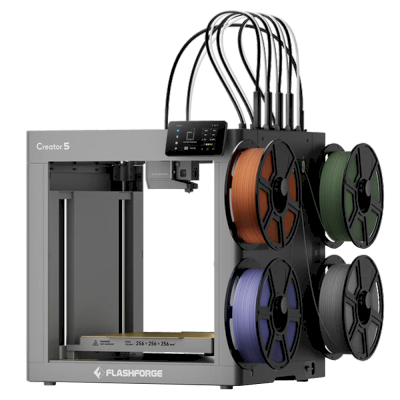
Flashforge Creator 5 at a glance
The Flashforge Creator 5 is a 3D printer by Flashforge with a 256 x 256 x 256 mm build volume.
- Build volume
- 256 x 256 x 256 mm
- Prints well
- PLA, PETG, TPU & flexibles
Connect the Flashforge Creator 5 to SimplyPrint
Does the Flashforge Creator 5 3D printer work with SimplyPrint, OctoPrint, Mainsail and Fluidd? Each way of connecting it, what it needs, and how to set it up.
-

SimplyPrint Client
Compatible
What you need: A computer or Raspberry Pi on the same network that stays on, running the SimplyPrint Client
-


Klipper (Moonraker)
Not compatible
-

OctoPrint
Directly, over USB
Not compatible
What works with SimplyPrint
Connected through SimplyPrint Client, SimplyPrint covers the core of what it offers on the Flashforge Creator 5: the camera and AI failure detection, remote printing, filament mapping for its multi-material unit and AutoPrint. Not available through SimplyPrint Client: skip objects, moving with the controls, homing, extrude and retract, change print speed, fan speed, baby stepping, send G-code, change filament, bed leveling and Z-Offset Calibration.
Every SimplyPrint feature, for each way of connecting it to SimplyPrint
| Connected to SimplyPrint through | |
|---|---|
| SimplyPrint feature | SimplyPrint Client Compatible |
| Monitoring | |
| Live status and progress | Yes |
| Webcam | Yes 1 |
| AI failure detection | Yes 1 |
| Time left | Yes |
| Layer progress | Yes |
| Temperatures | Yes |
| Printing | |
| Starting a print | Yes |
| Pause, resume and cancel | Yes |
| Skip objects | No |
| Print start options | Yes |
| Files | |
| Print sliced 3MF files | Yes |
| Printer control | |
| Change temperatures | Yes |
| Moving with the controls | No |
| Homing | No |
| Extrude and retract | No |
| Change print speed | No |
| Fan speed | No |
| Baby stepping | No |
| Send G-code | No |
| Calibration | |
| Change filament | No |
| Bed leveling | No |
| Z-Offset Calibration | No |
| Multi-material | |
| Map filament to multi-material slots | Yes 2 |
| Sync loaded filament from the multi-material unit | Yes 2 |
| Automation | |
| AutoPrint Pro | Yes |
| Download the file before the print starts | Yes |
Connected to SimplyPrint through SimplyPrint Client
Compatible
Monitoring
- Live status and progress Yes
- Webcam Yes 1
- AI failure detection Yes 1
- Time left Yes
- Layer progress Yes
- Temperatures Yes
Printing
- Starting a print Yes
- Pause, resume and cancel Yes
- Skip objects No
- Print start options Yes
Files
- Print sliced 3MF files Yes
Printer control
- Change temperatures Yes
- Moving with the controls No
- Homing No
- Extrude and retract No
- Change print speed No
- Fan speed No
- Baby stepping No
- Send G-code No
Calibration
- Change filament No
- Bed leveling No
- Z-Offset Calibration No
Multi-material
- Map filament to multi-material slots Yes 2
- Sync loaded filament from the multi-material unit Yes 2
Automation
- AutoPrint Pro Yes
- Download the file before the print starts Yes
Works Depends Not supported
- Needs a camera
- Needs a multi-material unit
What slicer to use for the Flashforge Creator 5
None of the slicers in SimplyPrint's cloud has a ready-made profile for the Flashforge Creator 5, but it takes standard G-code: start from a similar printer's profile and set the bed size, height and nozzle to match.
Flashforge's own slicer
-
Flash Studio / Orca-FlashforgeMade by Flashforge, not in the SimplyPrint cloud · Based on OrcaSlicer
-
FlashPrintMade by Flashforge, not in the SimplyPrint cloud
No profile for the Flashforge Creator 5
 PrusaSlicer
 OrcaSlicer
 BambuStudio
 ElegooSlicer
 CrealityPrint
 Cura
Cura Kiri:Moto
We only list slicers you can use in the SimplyPrint cloud, so there may be others for the Flashforge Creator 5.
Cloud-Based Slicer for Flashforge Creator 5
All supported slicers - directly in your browser with SimplyPrint's online cloud slicer. No installation required. Slice your Flashforge Creator 5 models from any device, anywhere in the world!
Try Online Slicer NowProfiles and other slicers
Automatic Profile Updates: Profiles are automatically checked and fetched from the slicer GitHub repositories every day, as well as from our own open-source community-driven slicer profile database. This ensures you always have access to the latest profiles.
Note: Other slicers, such as Simplify3D, ideaMaker, SuperSlicer and KISSlicer, aren't in our cloud, so we don't track their profiles. They may still work well with your Flashforge Creator 5: check the slicer's own documentation or forums for a profile. You can also contribute profiles to our open-source slicer profile database on GitHub.
The app for the Flashforge Creator 5
SimplyPrint works as the Flashforge Creator 5's app: on your phone and in any browser, with a slicer in the cloud.
What you get with SimplyPrint
- An app for iPhone and Android, the same in any browser, and a slicer in the cloud.
- More than monitoring: a print queue, AI failure detection, AutoPrint and accounts for a team.
- Printers from many brands in one place, side by side.
- A European cloud: hosted in Frankfurt, Germany, under the GDPR.


Running several Flashforge printers? See SimplyPrint's print farm software for Flashforge.
Automate the Flashforge Creator 5
There's no plate swapper or auto-ejection kit for the Flashforge Creator 5 in SimplyPrint yet, but AutoPrint can still keep it printing: once the plate is clear, it starts the next job from your queue.
Ways to automate it
- Your own ejection G-code Write the routine that clears your plate, and AutoPrint runs it after every print.
- A robot arm, or anything with an API Tell SimplyPrint the plate is clear through the API or a webhook, from a robot arm or your own system.
- Clear it by hand, keep the queue AutoPrint waits for you to mark the plate clear, then starts the next job.
AutoPrint comes with the Pro plan and up.
Flashforge Creator 5 specifications: bed size, print height and more
Its size, temperatures, multi-material and how it connects, from the maker and our own research.
Size
| Build volume | 256 x 256 x 256 mm |
|---|---|
| Bed type | Square |
| Bed size | 256 x 256 mm |
| Max print height | 256 mm |
Printing
| Max extruder temperature | 320 °C |
|---|---|
| Has heated bed | Yes |
| Max bed temperature | 120 °C |
| Number of nozzles | 4 |
| Direct drive | Yes |
| Probing tool / Auto Bed Leveling | Yes |
| Filament width | 1.75 mm |
Connecting
| Supports serial printing | No |
|---|---|
| Shipped firmware | The maker's own |
| Shipped local UI | Custom |
Files and slicing
| Supported file formats | G-code (.gcode, .gco, .g) |
|---|---|
| Slicer profile name(s) |
Flashforge Creator 5, Creator 5 |
| Has start options | Yes Available options: Bed Leveling, Flow Calibration, Timelapse |
The printer
| Printer manufacturer / brand | Flashforge |
|---|---|
| Printer model name | Creator 5 |
| Made by a company from | China |
Disclaimer: We strive to keep this information as current and accurate as possible, but cannot guarantee its completeness or reliability. Our data is based on user submissions and manufacturer references.
What filament can the Flashforge Creator 5 print?
Filament compatibility for the Flashforge Creator 5: the materials it can handle, judged from its hotend, bed, chamber and enclosure.
| Filament | Suitability | Notes |
|---|---|---|
| PLA | Great | The easiest filament to print. Works on almost any printer; a heated bed helps adhesion but is not required. |
| PETG | Great | Comfortably in range (PETG likes a ~230-250C hotend and a ~70-85C bed). |
| TPU & flexibles | Great | The direct-drive extruder feeds flexible filament well. Print slowly for clean results. |
| ABS & ASA | With care | The bed is hot enough, but ABS and ASA warp without an enclosure, which is strongly recommended for clean prints. |
| Nylon (PA) | With care | Possible with care - an enclosure and very dry filament are essential. |
| Polycarbonate (PC) | With care | On the edge - PC really wants an enclosed, hot chamber to avoid warping. |
| Carbon-fiber & glass-filled | With care | Possible if you fit a hardened or wear-resistant nozzle - the abrasive fibers quickly wear a stock brass nozzle. |
Tip: this is a general guide from the printer's specs - always check your filament's recommended settings. With SimplyPrint you can save a profile for each spool and track exactly what filament you have in stock.
Best filament for the Flashforge Creator 5
Filaments the Flashforge Creator 5 prints well, Flashforge's own first, then the best known.
Compare the Flashforge Creator 5 with similar printers
Printers from the same maker, of a similar size, printing the same engineering materials or multi-material like it, that you can buy today. Compare up to four side by side, with their specs and how each connects.
-
Flashforge Guider II S
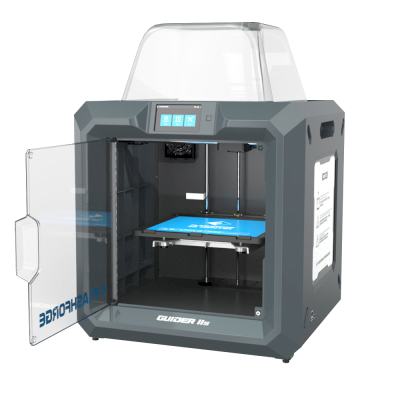 280 x 250 x 300 mmConnects with: OctoPrintAlso by Flashforge · Similar build volumeCompatible Compare side by side Flashforge Guider II S
 -
Flashforge Adventurer 4 Pro
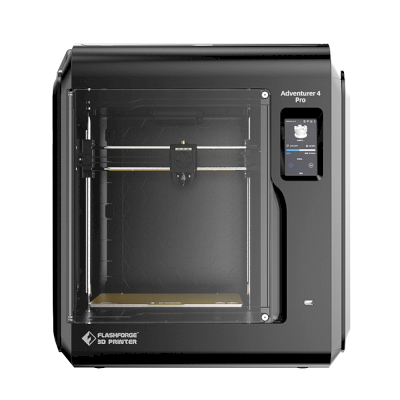 220 x 200 x 250 mmConnects with: Klipper (Moonraker), OctoPrintAlso by Flashforge · Similar build volume
 -
Bambu Lab P1S
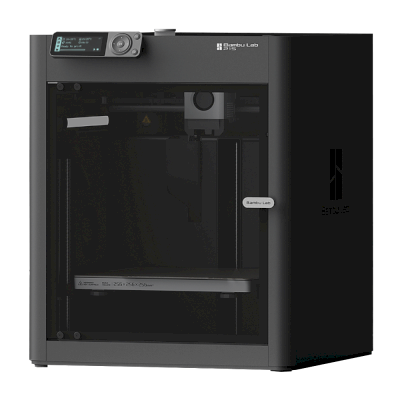 256 x 256 x 256 mmConnects with: SimplyPrint ClientSimilar build volumeCompatible Compare side by side Bambu Lab P1S
 -
Creality Ender-3
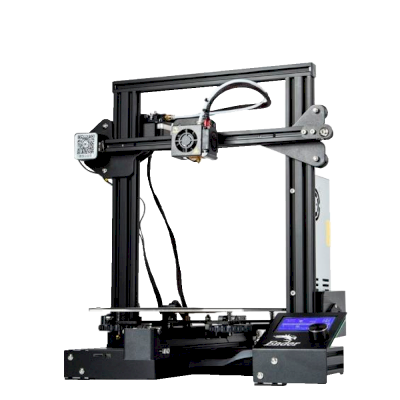 220 x 220 x 250 mmConnects with: Klipper (Moonraker), OctoPrintSimilar build volumeCompatible Compare side by side Creality Ender-3
Frequently asked questions
Is the Flashforge Creator 5 compatible with SimplyPrint?
Yes. You can connect the Flashforge Creator 5 to SimplyPrint via SimplyPrint Client, then slice, queue, start and monitor prints from your browser or the mobile app.
How do I connect the Flashforge Creator 5 to SimplyPrint?
Follow our step-by-step setup guide for the Flashforge Creator 5. It shows how to connect it via SimplyPrint Client, what you need for each, and which to pick.
What slicer should I use for the Flashforge Creator 5?
Cura, PrusaSlicer and OrcaSlicer all work with the Flashforge Creator 5, and you can run any of them in SimplyPrint's online browser slicer - no install needed, on any device.
Can I use OrcaSlicer with the Flashforge Creator 5?
Yes, but OrcaSlicer has no built-in profile for the Flashforge Creator 5 that we know of: start from a similar printer's profile and set the bed size, height and nozzle to match.
What filament can the Flashforge Creator 5 print?
Based on its specs (hotend up to 320C, heated bed up to 120C), the Flashforge Creator 5 handles PLA, PETG, or TPU & flexibles well. See the full filament guide above for ABS, nylon, PC and composites.
Does the Flashforge Creator 5 work with OctoPrint or Klipper?
Not that we know of, but you don't need either: SimplyPrint connects to the Flashforge Creator 5 via SimplyPrint Client.
What is the Flashforge Creator 5's bed size and build volume?
The Flashforge Creator 5 has a 256 x 256 mm print bed and prints up to 256 mm tall, a build volume of about 256 x 256 x 256 mm. See the full specifications table above for bed type, temperatures and more.
Can the Flashforge Creator 5 eject prints automatically?
There's no kit for it that we support yet, but SimplyPrint's AutoPrint can run your own ejection G-code, work with a robot arm through the API, or wait for you to clear the plate, and then start the next job from your queue.
Affiliate disclosure: Some links on this page are affiliate links. We may earn a commission if you make a purchase, at no extra cost to you. As an Amazon Associate, we earn from qualifying purchases.
© 2026 SimplyPrint. All rights reserved. This page and the compatibility, specification and review data on it are compiled by SimplyPrint and may not be copied, scraped, reproduced or republished, in whole or in part, without prior written permission. Printer images are the property of their respective manufacturers and are shown for identification purposes only; SimplyPrint claims no ownership of them. Quoted reviews belong to their authors.